Learn Guitar with Python

Source: Andrew Yardley on Unsplash
What can we do with Python to help us play an instrument?
In this tutorial, we will start off from scratch and see how we can use lists, dictionaries, and matplotlib to build a tool that can help us play the guitar. But before we start, let’s have a crash course in some principles of music we will need later on. If you’re curious, check out this interactive colab notebook to try it out yourself.
Background Information
Music theory is a complex subject made up of a lot of components. For the purposes of this post, we will be simplifying things here quite a bit, so if you are a musician don’t take it too seriously.
Pretend that you can imagine the spectrum of audible sound, and try to divide it into a musical system that makes sense for you and everyone around you. This is not easy! After centuries of struggle, humans have come up with a system that looks like this (but there are still disputes going on):

Figure: Notes and their frequencies
If you inspect the rows, you will notice that the notes are the same but the frequencies are different. What you see this way are called octaves: the interval between one musical pitch and another with double its frequency. It’s amazing to hear how this proportion make these different sounds feel so similar and related to one another. In fact:
The human ear tends to hear these as being essentially “the same” due to closely related harmonics.
For this post, we will not bother about implementing frequencies but will only take into account the different notes within an octave—those that you see in every column:

At this point, there are some things I must mention:
- The interval between C and C# or between C# and D (right next to each other) is called a semitone or half step.
- The interval between C and D or between F and G is called a tone or step.
But why I am saying this? Turns out the music you are used to hear is based on a set of musical scales. And these are nothing more than intervals between the notes that you choose to play. Or in more harsh terms, they are just patterns.
chromatic scale The easiest scale possible is the , in which you take all the semitones between an octave (literally all the different notes). Let’s create a variable to hold the A chromatic scale:
A = ['A','A#', 'B', 'C','C#','D','D#','E','F','F#' ,'G','G#']
The first note of a scale is called the root and gives the scale its name. It is also the place where you rest your fingers on when you are playing (as it feels like the base sound that holds everything together). Let’s see another chromatic scale starting with a root in C (the C chromatic scale):
C = ['C','C#','D','D#','E','F','F#' ,'G','G#','A','A#', 'B']
Interestingly, even though these two scales have exactly the same notes, because they start with a different root the intervals between the individual notes and the root is completely different, which makes these scales feel nothing like each other.
But enough about chromatic scales (taking all semitones doesn’t sound so pleasant). Guided by their sense of beauty, humans have come up with many ways of playing these notes. After a long selection process, some scales have stuck and flourished into the music we know today. If you hear any of these legendary scales you will notice they sound very distinct. Let’s take a look at the C major scale and compare it to the C chromatic scale shown above.
C_major_scale = ['C', 'D', 'E', F', 'G', 'A', 'B']
By taking only specific intervals, we create the major scale as shown below:
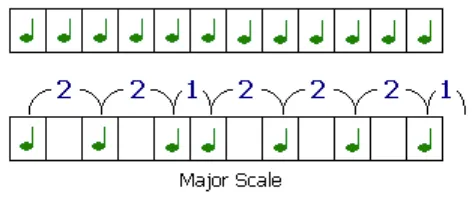
Figure: Intervals of the major scale: tone, tone, semitone, tone, tone, tone, semitone.
If we start with the C chromatic scale and follow this pattern, we get the C major scale. If we start with the A chromatic scale and follow these intervals, we get the A major scale and so forth.
By transforming these intervals to indexes, we can implement this in Python fairly easily. All we have to do it is access the values of a list using indexes. Let’s see how to get the notes of C major:
C = ['C','C#','D','D#','E','F','F#' ,'G','G#','A','A#', 'B']
# intervals of the major scale as indexes:
major_scale = [0, 2, 4, 5, 7, 9, 11]
# select elements with these indexes into a list
notes = [C[i] for i in major_scale]
print(notes)

In summary: using the intervals of a given scale as indexes, we can retrieve the notes that make up the scale. This is all you need to understand. We will be applying this principle over and over again to extract the notes that compose a given scale. Using this information, we will then plot where these notes are located in the guitar.
Overview
The purpose of this tutorial is to create a program with which you can find the position of the notes of a given scale in the guitar. For that, we will have to figure out methods to:
- Extract the notes composing a given scale.
- Locate where they are positioned in the strings of the guitar.
- Plot the strings and frets of the guitar along the notes of the scale.
Let’s start
Extracting notes
An easy way to create chromatic scales (without typing them explicitly) is to concatenate a list with all the notes within itself and slice the desired elements. Let’s see how:
whole_notes = ['C','C#','D','D#','E','F',
               'F#','G','G#','A','A#','B']*2
We concatenate two octaves worth of notes together and save it as whole_notes. Having a list like this allows us to easily slice chromatic scales, starting with any root. Let’s see an example with B:
# index where element 'B' is located.
root = whole_notes.index('B')
# starting from this index, slice twelve elements
B = whole_notes[root:root+12]
print(B)

Figure: B Chromatic Scale
Now that we have an octave starting from B, we can use the major scale intervals we defined to retrieve the B major scale (just as we did before):
notes = [B[i] for i in major_scale]
print(notes)

If we want to retrieve the notes contained in another scale, then:
another_scale = [0, 2, 5, 10, 11]
notes = [B[i] for i in another_scale]
print(notes)

Hopefully now you can see where this is all going. We’d better write this a function for convenience (this summarizes all the code we’ve implemented so far):
# get_notes.py
def get_notes(key, intervals):
    # a sufficiently long sequence of notes to slice from
    whole_notes = ['C','C#','D','D#','E','F','F#','G','G#','A','A#','B']*3
    # finding start of slice
    root = whole_notes.index(key)
    # taking 12 consecutive elements
    octave = whole_notes[root:root+12]
    # accesing indexes specified by `intervals` to retrieve notes
    return [octave[i] for i in intervals]
- We create a chromatic scale (
octave) starting at a given root. - Then extract the notes specified by
intervals(the indexes of notes to be played) and return them in a list.
Now let’s create a dictionary with common musical scales to make this more useful:
scales = {
    "major" : [0, 2, 4, 5, 7, 9, 11],
    "minor" : [0, 2 , 3, 5, 7, 10, 11],
    "dorian" : [0,  2,  3,  5,  7,  9, 10, 12],
    "phrygian" : [0, 1, 3, 5, 7, 8, 10, 12],
    "minor_pentatonic" : [0, 3, 5, 7, 10],
    "major_pentatonic" : [0, 2, 4, 7, 9],
    "harmonic_minor" : [0, 2, 3, 5, 7, 8, 10, 12],
    "mixolydian": [0, 2, 4, 5, 7, 9, 10],
    "minor_blues" : [0, 3, 5, 6, 7, 10],
    "locrian" : [0, 1, 3, 5, 6, 8, 10, 12],
    "lydian" :[0, 2, 4, 6, 7, 9, 11, 12],
}
Using this dictionary, we now have an easy way of accessing the notes of any scale, starting at any root as seen below:
get_notes('A', scales['minor'])

A Minor Scale
get_notes('E', scales['harmonic_minor'])

E Harmonic Minor Scale
get_notes('F', scales['minor_blues'])

Figure: F Minor Blues
and so forth…!

And so forth...
Creating the Guitar
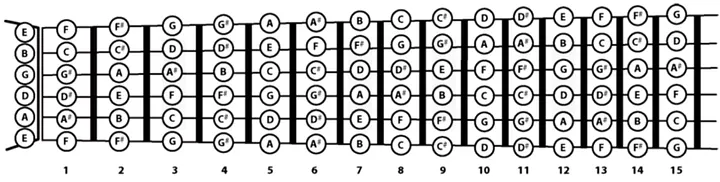
Figure: Guitar notes for the first 15 frets. We see the six strings of the guitar: low E, A, D, G, B, and high E. Source
We’re almost done! Now that we have a way of accessing the notes of a scale, let’s create a guitar to visualize them. This will involve representing the strings of the guitar as a dictionary. Let’s see how we can implement this:
# initializing a dict with the name of the strings as keys
strings = {i:0 for i in 'EADGB'}
for i in strings.keys():
    # finding the index of first note in the string
    start = whole_notes.index(i)
    # taking a slice of 20 elements
    strings[i] = whole_notes[start:start+20]
Just as we did before to create the octaves by taking slices of 12 list elements, here we take slices of 20 elements starting at the first note of each string and put them in a dictionary
print(string.keys())

print(string['E'])

Figure: Notes of the first 20 frets on the E string
By having the notes in the strings in this manner, we are now able to match them with the notes of our scales to find their position.
Finding notes in the guitar
To record the positions of the notes, we will be creating yet another dictionary. For each note in a given scale we will add the position (index) where it is located in each string of the guitar. For this we will be doing the same we’ve been doing so far: accessing elements of lists using indexes.
# find position of notes of a given scale in the guitar
def find_notes(my_scale):
    notes_strings = {i:0 for i in "EADGB"}
    # for every string
    for key in strings.keys():
        # we create an empty list of indexes
        indexes = []
        for note in my_scale.notes:
            # append index where note of the scale is found in
            ind = strings[key].index(note)
            indexes.append(ind)
            # because there are 20 frets, there are duplicate notes in the string
            if ind <= 7:
                # we must also append these to indexes
                indexes.append(ind+12)
        notes_strings[key] = indexes
    return notes_strings
The only little detail we have to pay attention to is that because the our strings contain 20 and not 12 notes, some notes are repeated. As we saw before by printingstrings['E'], all the notes from E to B are repeated twice. The last note to be repeated, B, is at indexes 7 and 19. So, for all notes found in the strings at an index 7 or less we must add its duplicate index.
Calling the function returns a dictionary with the name of the strings as keys and the position of notes in the specified scale as values.
# finding notes in a scale:
C_minor_blues = get_notes('C', scales['minor_blues'])
# finding positions of these notes in the guitar, as a dict
positions = find_notes(C_minor_blues)
print(positions)

Figure: Position of notes of the C Minor Blues scale
# accessing note positions in string E
print(positions['E'])

Now that we have easy access to this information, we are finally able to plot this in the guitar!
Plotting the Guitar
Displaying a guitar involves several steps:
- Plotting the strings E, A,D,G,B and high E as horizontal lines in a 2D plot at different heights y=1, 2, 3, 4, 5, 6. (For loop line 9 ).
- Plotting the frets of the guitar as vertical lines. (For loop line 12).
- Finding the position of notes for our desired scale using the function find_notes from before and saving them as a dictionary to_plot.
- Creating circles with labels inside to represent the notes and their location in the guitar. (Nested for loop lines 28, 29).
I also added some non-essential code to make it look cooler. Make sure to check the comments if you are curious.
# plot_guitar.py
import matplotlib.pyplot as plt
import numpy as np
import matplotlib.patches as mpatches

def plot(key, intervals, night=True):
    scale = get_notes(key, intervals)

    # Plot Strings
    fig, ax = plt.subplots(figsize=(20,6))
    background = ['white', 'black']
    for i in range(1,7):
        ax.plot([i for a in range(22)])

    # Plotting Frets
    for i in range(1,21):
        # decorates the twelve fret with a gray and thick fret
        if i == 12:
            ax.axvline(x=i, color='gray', linewidth=3.5)
            continue
        # trace a vertical line (a fret)
        ax.axvline(x=i, color=background[night-1], linewidth=0.5)
    ax.set_axisbelow(True)

    # setting height and width of displayed guitar
    ax.set_xlim([0, 21])
    ax.set_ylim([0.4, 6.5])
    # setting color of the background using argument night
    ax.set_facecolor(background[night])
    # finding note positions of the scale in the guitar
    to_plot = find_notes(scale)

    # for every note of the scale in every string make a circle
    # with the note's name as label in the corresponding fret
    for y_val, key in zip([1,2,3,4,5,6], 'EADGBE'):
        for i in to_plot[key]:
            font = 12
            x = i+0.5  # shift the circles to the right
            p = mpatches.Circle((x, y_val), 0.2)
            ax.add_patch(p)
            note = strings[key][i]
            # if note is the root make it a bit bigger
            if note == scale[0]:
                font=14.5
            # add label to middle of the circle
            ax.annotate(note, (i+0.5, y_val), color='w', weight='bold',
                            fontsize=font, ha='center', va='center')

    plt.title('_| _| _| _| _|'*16)
    plt.yticks(np.arange(1,7), ['E', 'A', 'D', 'G', 'B', 'E'])
    plt.xticks(np.arange(21)+0.5, np.arange(0,22))
    plt.show()
Here is the end result of this little adventure: by calling the function plot and specifying a root and a scale, we can display a matplotlib guitar with the info we need to play along.
plot('C', scales['major'])
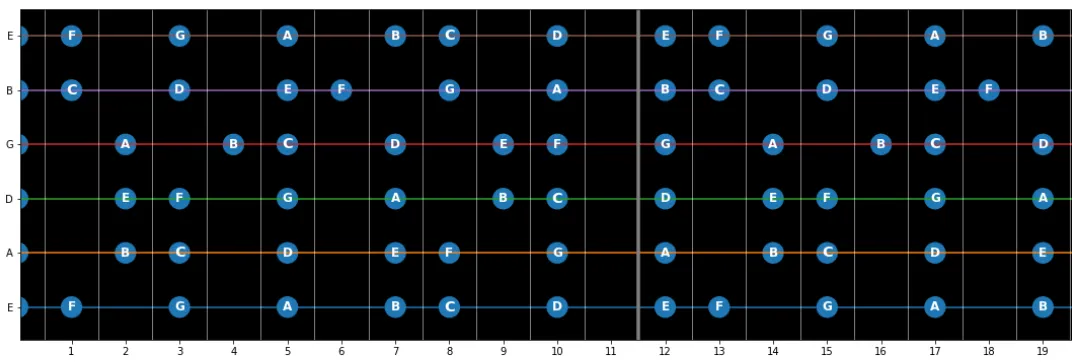
Figure: C Major
plot('F', scales['lydian'])
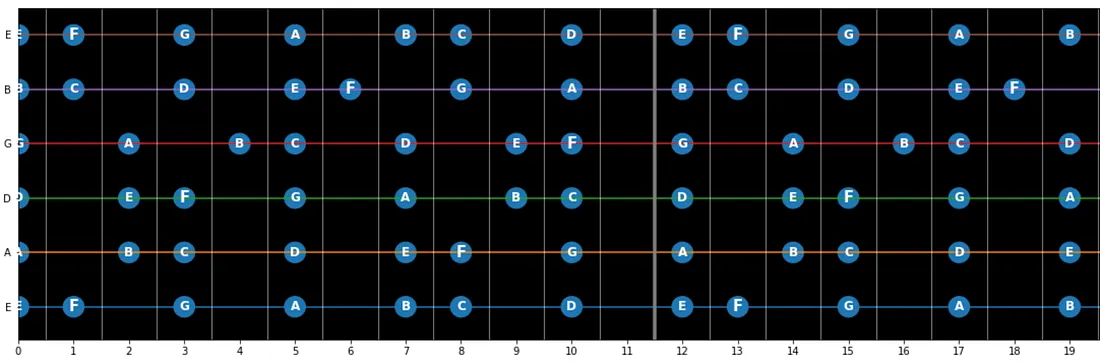
Figure: F Lydian
plot('D', scales['minor_blues'])
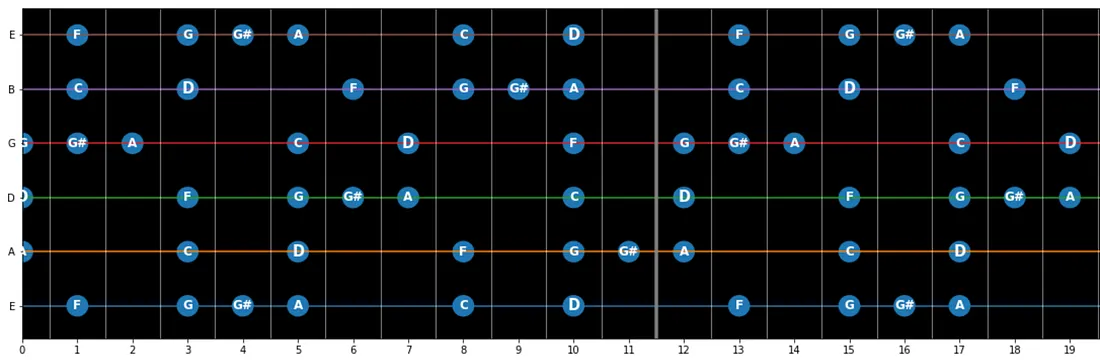
Figure: D Minor Blues
Now we can play any scale we want without having to google it all the time. If you feel like playing your own custom scales, just add them to the scalesdictionary.
Thanks for reading!
That’s it! I hope you had some fun reading these thoughts—and that you actually use this to play the guitar!
In the collab notebook, I implemented some dropdown menus to make it easier to use, so feel free to check that out.